How to Extract Stress, Pore Pressure, and Geogrid Tensile Force at Specific Coordinates in FLAC?

Hello everyone and ITASCA support team,

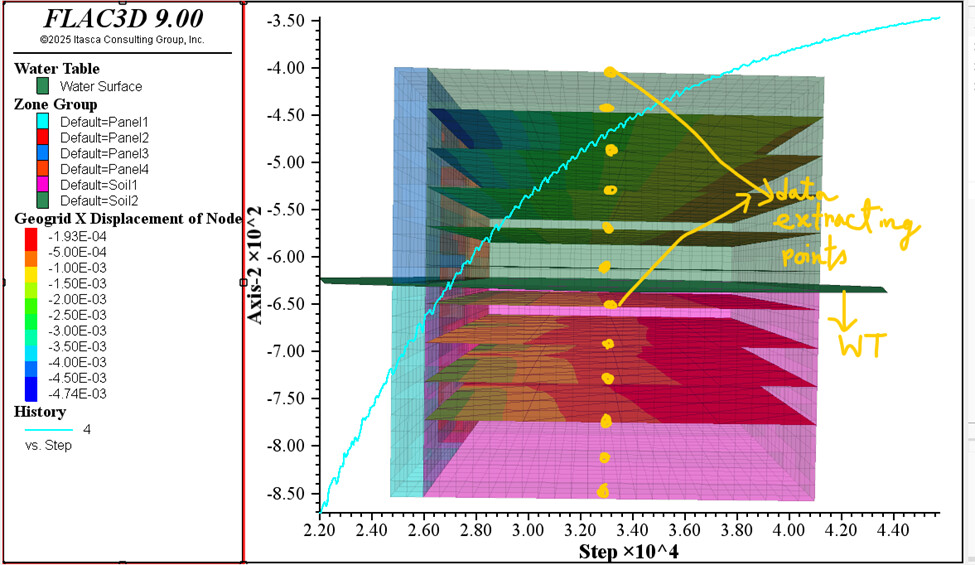
I am currently working on an MSE wall model in FLAC. I assigned fluid properties to the backfill soil and set the water table at mid-height, then ran the model under gravitational (geostatic) loading.

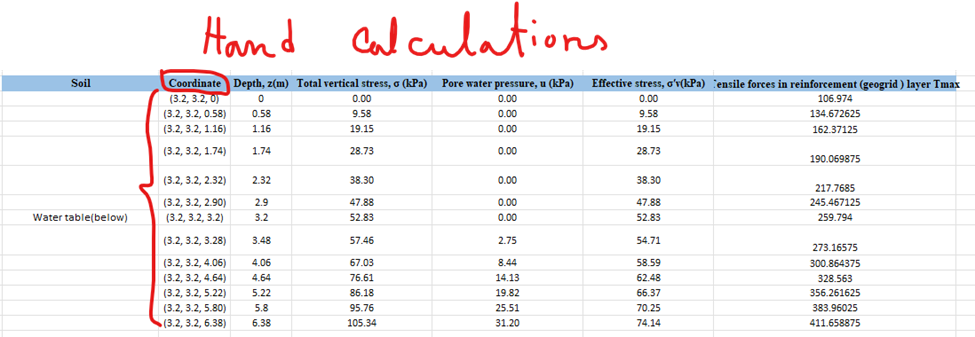
My objective is to extract soil stresses, pore pressures, and geogrid tensile forces at specific coordinates within the backfill and compare these values with my hand calculations.

I was able to generate pore pressure and stress curves using history commands, but I am not sure which command should be used to extract the tensile force in the geogrid elements.

Additionally, I am confused about how to correctly compare FLAC results with hand calculations. In my hand calculations, I obtain a single value at each coordinate, whereas FLAC provides curves over time or steps. How can I extract the exact stress/pore pressure/tensile force values at specified coordinates so that I can directly compare them with my hand-calculated results?

Any guidance or clarification would be greatly appreciated.

Thank you.


Hello ITASCA Support Team,

I would appreciate some guidance on this issue. I am confused about how to correctly compare my FLAC results with hand calculations. In my hand calculations, I obtain a single value at each coordinate, but FLAC provides results as curves over time or steps.

From FLAC, I want to extract the correct values of soil stress, pore pressure, effective stress, and geogrid tensile stress/force at specific points so that I can directly compare them with my hand calculations. Could you please advise which values I should take from FLAC and the proper way to extract them for comparison?

Thank you.

Hello @Sudipta

You can compare your hand calculations for things like stress, pore pressure, etc… to the model results after the model has equilibrated. I am not sure what loading or fluid perturbation you are applying in your model, but after the model cycles to equilibrium, then you can check against your hand calculations.

Also, you can use the struct.node.force.unbal.global() FISH function to get the force an a geogrid node.

Hello Sir @dblanksma

Thank you for your response, sir.

For extracting the geogrid results, I used the following commands:

; Tensile force
structure geogrid history resultant-nx position (3.2,3.2,0.58) surface-x (1,0,0)

; Tensile stress
structure geogrid history stress-xx position (3.2,3.2,0.58) depth-factor 0

At the moment, I am only applying gravitational loading (geostatic loading) using model gravity 10. I want to check the resulting soil stresses, pore pressures, effective stresses, and geogrid responses, and then compare them with my hand calculations.

For the fluid system, I used the following setup:

model configure fluid
zone fluid biot on
zone fluid cmodel assign isotropic range group 'Soil1' or 'Soil2'
zone fluid property permeability 1e-9 porosity 0.35 range group 'Soil1' or 'Soil2'
zone fluid property biot 1.0 range group 'Soil1' or 'Soil2'
zone gridpoint initialize biot 6.29e+09 range group 'Soil1' or 'Soil2'

zone water density 1000
zone water plane origin (0,0,3.2) normal (0,0,1)

; Top surface = zero pore pressure
zone face apply pore-pressure 0 range group 'Top'

; West / East / South / Bottom = no-flow boundaries
zone face apply discharge 0 range group 'West' or 'East' or 'South' or 'Bottom'

For geostatic stress initialization and reaching equilibrium, I used:

model mechanical active on
model fluid active off
zone initialize-stresses ratio 0.5
model solve convergence 1e-5

model fluid active on
model mechanical substep 50
model fluid substep 10
model solve fluid time-total

; Equilibrium under gravity
model gravity 10
zone initialize-stresses ratio 0.5
zone ratio local
model solve ratio 1e-4

Regarding the exported Excel data from FLAC:
The history plots give many values over the steps/cycles, and I am unsure which value should be used for comparison with hand calculations. Currently, I am taking the maximum values, but I am not sure if this is correct.

Could you please clarify which step/time value should be used after equilibrium?

Thank you again for your support.

Hello @Sudipta

I am not sure I follow what you are doing. When initializing the stresses under gravity you don’t need to run a coupled fluid-mechanical solve. First, initialize the mechanical (no fluid) stresses under gravity with the zone initialize-stress command followed by model solve. Next initialize the pore pressure with the zone water command or the zone gridpoint initialize pore-pressure command. Now you can check total stresses, effective stresses and pore pressures to see if they agree with your hand calcs.

I am not sure how you are implementing the geogrids, my above suggestions are with our any soil support, but it’s a good place to start. I’d suggest sending your model files to flac3dsupport@oneitasca.com

Hello sir @dblanksma

I hope you are doing well.

I have a couple of clarifications regarding the correct workflow in FLAC3D, especially related to geostatic initialization and history recording.

1. Geostatic Stress & Water Table Setup
After creating the geometry, I understand that I need to initialize the geostatic stresses and then define the water table using the zone water plane command. However, I am unsure whether I also need to assign a fluid constitutive model. Specifically:

  • Do I need to configure a fluid model using zone cmodel configure fluid and assign fluid properties such as permeability, porosity, fluid density, etc.?
  • If I am not performing a coupled flow–mechanical analysis (only “no-flow” mechanical pore-pressure generation), should I activate the fluid model initially and then turn it off using model mechanical active on and model fluid active off?
    I want to confirm whether the fluid model is necessary just to define initial pore pressures for the geostatic step.

2. History Recording and Final Solve Commands
After setting history commands (for example, to track stress, pore pressure, or displacement), I noticed that if I do not run additional steps, the histories remain empty.

Could you please confirm the correct procedure?

  • After defining history records, do I need to run something like:
model step 1000
model solve
model save

or any similar command to ensure that the histories actually record data?

I want to understand the proper sequence of commands required to generate curves and export the recorded data.

Thank you very much for your guidance.
Please let me know if you need any parts of the model for reference.

Hello ITASCA Support Team,
I hope you are doing well.

I am writing to kindly follow up on my earlier message regarding the difficulties I am facing with my MSE wall model. I have shared the model details and the specific issues I am encountering, but I am still unsure how to move forward.

If you could please review my queries and provide some guidance or suggestions, it would mean a lot to me. Your expertise would greatly help me understand the source of the problem and improve my model.

Thank you very much for your time and support.

Hello @dblanksma
I hope you are doing well.

I wanted to kindly follow up on my earlier message regarding the geostatic initialization and history recording workflow in FLAC3D. I understand you may be busy, but I am currently struggling to resolve these issues on my own, and I would truly appreciate your guidance.
Kindly check my previous message.
Thank you very much for your time and support.